
.png)
Learn how presales is evolving and howyour team can stay ahead in atech-driven sales landscape.

This article is part of our comparison of demo automation platforms. For the side-by-side evaluation matrix, total cost of ownership, and implementation timelines, see the full Demoboost and Demostack platform comparison. This piece covers what changed in 2026: the buyer-facing agents Demostack launched in June, what Demoboost AI and Wingman AI do on the builder side, the two kinds of security evidence each vendor holds, and what a team that ran Demostack for over two years found after moving.
Demoboost and Demostack both help revenue teams create controlled product experiences without relying on a live production environment for every demo. Their capabilities overlap across interactive demos, sandbox-style experiences, personalization, analytics, and enterprise controls, but they approach the demo lifecycle differently.
Demoboost is built around scaling the complete demo workflow across revenue teams. Teams can create and combine demo content, personalize it for different accounts and audiences, govern reusable assets, enable sellers to work more independently, distribute experiences across the buyer journey, and use engagement data to inform follow-up and revenue workflows. The same demo infrastructure can support presales, sales, marketing, customer success, and partner use cases across live calls, follow-ups, websites, events, and self-guided buyer experiences.
Demostack takes a more simulation-centered approach, with an emphasis on high-fidelity product cloning, live overlays, AI-assisted simulation building, a buyer-facing AI Demo Partner, and access to demo intelligence through Model Context Protocol (MCP) tools.
Choose Demoboost when you want a reusable, governed demo system that can scale beyond individual demo creation and support how multiple teams build, personalize, deliver, share, measure, and maintain product experiences. Choose Demostack when high-fidelity product simulation, a buyer-facing AI presentation agent, or MCP access to demo intelligence is a defining requirement for your use case.
Demoboost rows state the plan that carries each capability because Demoboost publishes plan-level packaging. Demostack rows reflect capabilities documented in its public materials. Demostack does not publish plan-level packaging, so "plan availability not published" means buyers should confirm availability and any additional cost during the sales process.
Pricing methodology: Demoboost prices are monthly equivalents billed annually and were verified against the Demoboost pricing page on August 25, 2026. Demostack does not publish plan amounts on its own site, so buyers should confirm current pricing, packaging, and feature availability directly with Demostack.
The clearest difference is how each platform approaches the demo operation.
Demoboost is built around a reusable, governed demo infrastructure that supports the full demo lifecycle. Teams can capture interactive HTML screens, screenshots, video, and mobile experiences from different product environments, combine them into tailored demos, personalize them for different accounts and audiences, and build sandbox or overlay experiences when the use case requires more depth. The same governed content can then be reused across live calls, seller-led demos, websites, buyer follow-up, digital sales rooms, events, and offline delivery, with engagement data feeding back into revenue workflows.
Demostack takes a more simulation-centered approach. Its Cloner creates an independent demo environment that models product workflows without depending on the live backend. It also supports live overlays, mobile demos, tours, sandboxes, and Playbooks for organizing and sharing demo content.
Both platforms therefore cover overlapping demo formats, but format alone does not capture the larger difference. The more useful evaluation is how each platform fits the complete demo lifecycle: how easily teams can create and combine experiences, personalize and govern them, enable sellers to reuse them, distribute them across the buyer journey, measure engagement, and keep demos current as the product changes.
Demoboost supports multiple ways to create and assemble product experiences within the same platform:
A key part of the creation model is reuse and composition. Teams can capture screens from production, staging, separate tenants, or other product environments and combine them into a single demo rather than maintaining a dedicated environment for every scenario. Existing screens and approved demo assets can also be reused to create new experiences for different industries, personas, accounts, and use cases.
AI extends that workflow. Demoboost AI and Wingman AI help teams personalize and edit demo content using natural-language instructions, including changes to copy, imagery, data, charts, and layouts. This allows teams to adapt existing experiences instead of rebuilding each variation from scratch, while keeping changes within a governed creation process.
The entry plan includes unlimited HTML, screenshot, and video demos. Mobile demos are available from Essentials, sandbox demos from Growth, and overlay demos on Enterprise. Demoboost publishes this plan-level packaging on its pricing page, so buyers can see which creation capabilities are included before entering a sales process.
Presales teams can then organize approved templates and reusable assets in a governed library and give sellers controlled ways to personalize and reuse them. The result is not just another way to capture a product: it is a creation model designed to turn product experiences into reusable demo infrastructure that can scale across teams and use cases.
Demostack offers several formats, but its most distinctive capability is the Cloner. Demostack says the Cloner captures how the product front end interacts with the backend, then reproduces key workflows in an independent environment. The resulting simulation can be edited and reset without depending on the production system.
Demostack also supports a live overlay that changes text, images, data, and branding while preserving the live product's backend behavior. Its public site presents product tours, sandboxes, and mobile demos alongside these two approaches. Which plans include which of these is not published.
AI is now a meaningful difference between the two platforms, but the comparison should not be reduced to a yes-or-no feature cell. Both vendors shipped significant AI work in 2026, and in both cases the recency is worth testing rather than assuming.
Demoboost uses AI across the demo creation and personalization workflow, with Wingman AI providing natural-language editing and Demoboost AI supporting broader personalization, localization, data editing, and narration.
With Wingman AI, builders can describe the outcome they want instead of editing individual UI elements manually. It can rewrite content, replace imagery, repopulate charts and data, restyle interface elements, and restructure layouts from natural-language instructions. Target Mode can focus the instruction on a selected element when a precise change is needed. Wingman shows its reasoning and summarizes proposed changes for review before they are applied, combining faster editing with human control over the final experience.
Demoboost AI extends personalization beyond individual edits. Teams can refine guides, generate and adapt graph data, personalize demo content, create AI avatar narration through Synthesia or HeyGen, and translate experiences into more than 170 languages. Localization can cover interface text, guides, Speaker Notes, and other supported demo content, depending on plan.
Together, these capabilities are designed to help teams turn an existing demo into tailored experiences for different accounts, industries, personas, regions, and use cases without rebuilding each version manually. The emphasis is on scaling demo production and personalization while keeping the underlying content governed and the final experience under the team's control.
Demostack's AI Agents cover two distinct jobs.
The Builder Agent handles builder-side editing. A user describes a change in plain English, reviews the execution plan, and applies it across fields, charts, and assets. Demostack also documents AI database bulk category editing and natural-language changes to data rules. Like Wingman AI, it puts a review step between the instruction and the change, so on that specific point the two are comparable.
Demo Partner is the buyer-facing agent. Demostack documents hybrid navigation across a guided "Show Me" mode and a hands-on "Let Me Try" mode, real-time recognition of on-screen elements for in-context answers, interaction blockers that keep users on a defined path, and proficiency and engagement analytics.
What Demostack's public materials do not document is how the agent sources its answers, what happens when a buyer goes off script or asks about pricing, and how a person takes over mid-session. For an agent this new, those answers matter more than the feature list, and they are worth getting in writing rather than in a demo.
Both platforms extend beyond a website product tour.
Demoboost pairs delivery with two enablement layers built for the person running the call. Speaker Notes attach screen-by-screen talking points, product facts, and strategic cues visible only to the presenter. During a Live Session, a navigation toolbar lets the presenter move between screens, reveal guides or links, and adapt the path in real time. Sellers also use Playlists, demo menus, digital sales rooms, and Choose Your Own Journey so buyers explore the parts that match their role. Demos share by link, embed on a website, or download through the Offline Library for trade shows, travel, and restricted networks.
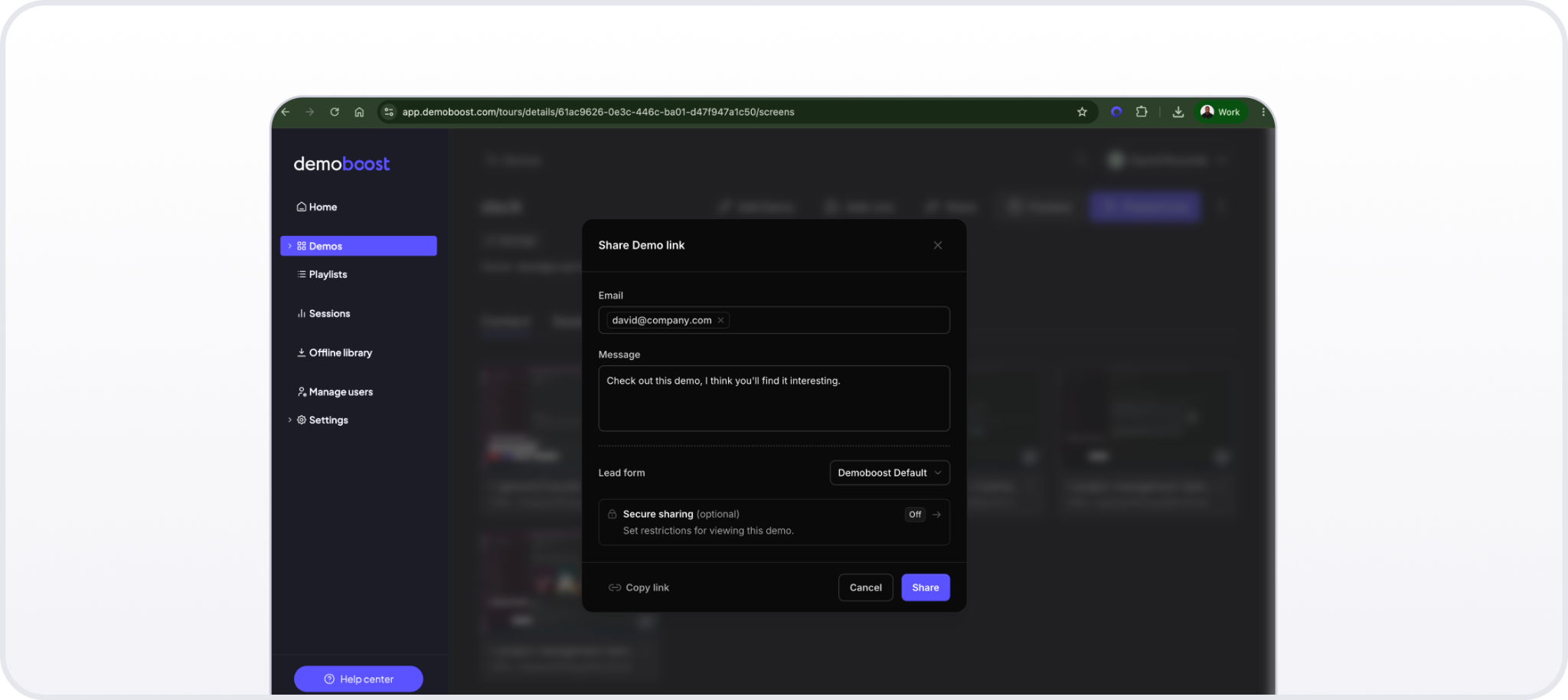
A shareable demo link lets a team reuse the same approved product story before, during, and after a sales conversation.
Demostack uses Playbooks to group demos, decks, PDF files, and product tours by persona, industry, use case, or partner. It also supports shareable leave-behinds and mobile demos presented alongside a web product from a laptop, plus the agent-guided delivery described above.
When testing delivery, include the people who will actually use the platform. Ask an account executive to find and run an approved first-call story without help. Ask a presales specialist to personalize it for a named buyer. Then share the follow-up with a second stakeholder and check what the seller learns from the engagement.
Both vendors connect demo activity to revenue workflows, and both offer webhooks. The packaging differs.
Demoboost Demo Analytics covers individual viewer journeys, asset performance, live-demo activity, and team usage. Revenue Intelligence, from the Growth plan, scores leads as warm, gaining momentum, or gone quiet based on recent engagement, repeat visits, completion, screens viewed, CTA clicks, and sharing activity, with period comparison and CSV export. Demo activity reaches other systems via Global Webhooks, which route demo-created, demo-completed, and lead-form-completed events into middleware such as Zapier, Make, or Workato and on to CRM, marketing automation, communication, or business intelligence tools.
.png)
Demoboost analytics view
Demostack documents direct MarTech integrations, plus webhooks that push real-time demo events to any CRM, data warehouse, BI tool, or custom endpoint. Its public product pages describe buyer engagement, demo performance, and deal visibility.
Do not accept a generic statement that a platform has analytics. Ask each vendor to show:
A dashboard, a webhook, and a direct CRM integration are three different things. Verify which are included in the plan you are considering, from either vendor.
Both vendors publish enterprise security capabilities, but their public evidence uses different standards, and the difference matters more than which name sounds stronger.
Demoboost holds ISO/IEC 27001 certification. That is a certification against an international standard, issued by an accredited body after auditing the information security management system, with recertification cycles. Demoboost hosts customer data in the European Union, complies with GDPR, and supports single sign-on (SSO) and role-based access control (RBAC). Enterprise adds SSO and full domain white labeling. Details are in the Security Trust Center.
Demostack states that it holds a SOC 2 Type II attestation from PwC. That is an attestation report from an audit firm examining whether controls operated effectively over a period, rather than a certification against a standard. Demostack also lists SSO, role-based access, continuous monitoring, regular penetration testing, and alignment with GDPR, the California Consumer Privacy Act, and Health Insurance Portability and Accountability Act frameworks.
Neither is a ranking, and the two answer different procurement questions. ISO/IEC 27001 and European Union hosting come up most often with European enterprise and public-sector buyers. SOC 2 Type II comes up most often in North American software procurement. Which one you need is usually decided by your buyers rather than by you.
Ask both vendors for current audit reports and their effective periods, data-processing terms, subprocessor lists, hosting regions, retention rules, incident response commitments, and identity provider support. Let your security team evaluate the evidence against your requirements rather than treating certification names as a simple ranking.
Demoboost publishes four plan levels:
Demoboost does not offer a self-serve free trial. The path in is a live demonstration.
Demostack pricing is not publicly listed. Its pricing page carries no plan amounts and no named tiers, and directs buyers to contact Demostack for a quote. The page does not state whether implementation is included, billed separately, or structured by plan.
One third-party figure is public. Demostack's listing in HubSpot's App Marketplace shows a Standard plan at $55,000 per year covering 10 included users, one application, HubSpot integration, and Bronze-level expert services, with additional users at extra cost. The listing names further tiers, Plus, Pro, and Premium, without attaching prices to any of them, and carries HubSpot's notice that marketplace pricing is for display purposes only and excludes taxes, discounts, and other pricing variables. Treat it as an indication of scale rather than as a quote.
You cannot make a defensible claim that either platform is cheaper without a Demostack quote for the same scope. Compare total annual cost using the same number of creators and presenters, required environments, AI features, integrations, implementation support, and service hours. Our full platform comparison breaks down total cost of ownership in more depth.
Published pricing is itself a procurement variable, and it cuts both ways. It sets how fast you can reach a number and how easily you can compare two proposals. It also means a published price is a list price, and a quoted price may be negotiated.
Demoboost is likely the stronger fit when you need:
Demostack is likely the stronger fit when you need:
Because Demostack does not publish plan-level packaging or pricing, confirm for each item which plan includes it, what implementation is required, what support is allocated, and what the total cost is.
The comparison looks beyond feature-by-feature differences to what happens in practice: a company that ran Demostack in production for over two years, encountered its limitations, and ultimately moved to Demoboost. Its reasons were architectural rather than cosmetic, and the results are published and attributed.
Radiant Security is an AI-powered Security Operations Center company whose small sales engineering team supports a global sales organization. It used Demostack for more than two years before moving to Demoboost, which makes it the most direct evidence available here.
Two constraints drove the switch. First, composition across environments: Radiant's strongest alert examples and investigation flows were spread across customer tenants, staging environments, and partner instances, and working inside a single cloned environment meant those examples stayed where they were. Second, modular maintenance: keeping the previous demo current meant rebuilding rather than updating in place, a significant update could take two days, and the demo had fallen roughly six months behind the product.
Interesting examples live in different environments. The ability to build a coherent story for a demo is what made us switch to Demoboost.

After the move, Radiant reported a 75% reduction in demo maintenance time and 10 to 20 hours saved per update cycle. Its flagship sandbox grew past 500 screens drawn from multiple environments, and within two weeks every prospect-facing demo was running through Demoboost. Full details are in the Radiant Security story.
A feature checklist only tells part of the story. A stronger evaluation tests how each platform supports the complete demo lifecycle, from building the first experience to scaling, governing, measuring, and maintaining it over time.
Run the same proof of concept on both platforms and score each against the same criteria:
The goal is not simply to determine which platform can recreate a product experience. It is to understand what happens after that first demo is built: how easily your team can reuse it, personalize it, govern it, put it in sellers' hands, learn from buyer engagement, and keep it current.
If either vendor cannot demonstrate a step, document whether the limitation comes from the product, the selected plan, or the requirements of your particular use case. Weight each criterion according to how your organization actually builds and delivers demos rather than treating every capability as equally important.
Demoboost and Demostack overlap across many core demo formats. The more important distinction is not simply whether each platform can create an interactive demo, but how well it supports everything that happens after that demo is built.
Choose Demoboost if you need a demo platform designed around the broader demo lifecycle: creating and combining experiences across environments, reusing modular content, maintaining demos as the product changes, governing what teams can access and edit, enabling sellers to work more independently, supporting buyer follow-up, delivering demos offline, and connecting engagement data back to revenue workflows. Demoboost also publishes plan pricing, making it easier to understand the commercial starting point before entering a sales process.
Choose Demostack if your requirements center primarily on simulation, including high-fidelity product clones, live overlays, buyer-facing AI guidance, or MCP access to demo intelligence. These capabilities may be particularly relevant when recreating the behavior of a complete product environment is the central requirement.
For teams comparing the two, the most useful test is therefore not who can produce the most impressive first demo. It is which platform requires less effort to create, adapt, govern, distribute, measure, and maintain the demos your organization will actually use at scale.
1. Is Demoboost better than Demostack?
For teams looking to scale demos across the full buyer journey, Demoboost offers the broader fit. It combines multi-format demo creation, composition across product environments, AI-assisted personalization, modular reuse and maintenance, governance, seller enablement, offline delivery, buyer engagement intelligence, and Revenue Intelligence within one demo workflow. It also publishes plan-level pricing and packaging.
Demostack takes a more simulation-centered approach and may be a stronger fit when high-fidelity product cloning, a buyer-facing AI presentation agent, or MCP access to demo intelligence is a defining requirement.
The best choice ultimately depends on your use case, but teams evaluating how demos are created, personalized, governed, reused, distributed, measured, and maintained at scale should consider Demoboost across that complete lifecycle rather than comparing the platforms on demo creation alone.
2. Does Demostack support live overlays and sandbox demos?
Yes. Demostack publicly documents live overlays, cloned demo environments, sandboxes, product tours, and mobile demos. Its public pricing page does not show which plan includes each capability, so confirm packaging in the sales process.
3. Which platform has AI agents?
Both platforms use AI, but with different approaches. Demoboost combines Wingman AI with a broader AI-powered creation and personalization workflow. Wingman is a builder-side agent that uses natural-language instructions to rewrite content, update imagery and data, repopulate charts, restyle UI elements, and restructure layouts, with proposed changes summarized for review before they are applied. Demoboost AI also supports localization, data and graph editing, guide refinement, and AI-powered narration.
Demostack uses agents for both building and buyer-facing presentation. Its Builder Agent supports changes to simulated product environments, while Demo Partner can guide buyers through a demo or assist a seller during presentation.
4. Which platform has more transparent pricing?
Demoboost publishes annual plan prices and feature availability, starting at $375 per month billed annually. Demostack pricing is not publicly listed, so a direct total-cost comparison requires a quote. One third-party figure exists: a Demostack listing in HubSpot's App Marketplace shows a Standard plan at $55,000 per year for 10 users and one application, marked display-only.
5. Can both platforms create mobile demos?
Yes. Demoboost lists mobile demos from Essentials. Demostack publicly describes mobile cloning or overlays, side-by-side web and mobile presentation, and shareable mobile leave-behinds, currently in beta for Android, without publishing the required plan.
6. Which platform is better for enterprise security?
Both publish enterprise controls, and they are different kinds of evidence. Demoboost holds ISO/IEC 27001 certification, an audited certification against an international standard, with European Union data hosting, GDPR compliance, SSO, and RBAC. Demostack states it holds a SOC 2 Type II attestation, an audit report on control effectiveness over a period, plus SSO, role-based access, and alignment with several privacy and health data frameworks. The better fit depends on your hosting, certification, identity, and procurement requirements.
7. Can I migrate from Demostack to Demoboost?
Yes, and migration should begin with the demo stories and workflows you still need, not a screen-for-screen copy of every old asset. Radiant Security moved every prospect-facing demo across within two weeks of starting. Demoboost can help rebuild priority flows, set up reusable variables and themes, organize the library, and define distribution and analytics requirements. Use a phased rollout so sellers retain access to approved demos during the transition.
Book a live demo to see how Demoboost helps your team cut demo prep time, qualify buyers faster, and focus on real opportunities.
Book a Live Demo

.png)
.png)
