
.png)
Learn how presales is evolving and howyour team can stay ahead in atech-driven sales landscape.

You're prepping for a big call.
You start the same way every time — you open your deck, because that's the company standard. Then you move into your demo environment and start shaping the story you want to tell live.
You update the data so it matches the narrative. You pull together the right workflows. In many cases, the screens you need aren't in one place — they sit across multiple orgs, tools, or modules. So you open everything in advance, just to make sure you can jump between them smoothly once the call starts.
And then the meeting begins.
You guide the conversation, switching between tabs, environments, and scenarios — stitching together one coherent story from multiple systems. It works, but only because someone who understands the product deeply is driving it. You would rarely hand this to an Account Executive and expect them to navigate that labyrinth under pressure.
After the call, you send a recording.
Most people won't watch it. Some will skim parts of it. And in many cases, your champion tries to recreate the story internally — with varying degrees of success.
So the cycle repeats. Same setup. Same preparation. Same dependency on someone who knows the system well enough to navigate it live.
Now picture the same call with an automated sandbox demo.
You've captured screens from different orgs and integrated different tools into one flow. There's a pre-defined narrative, but you can jump to wherever the conversation takes you. You have speaker notes — so an AE can run this confidently without needing to be a product expert. After the call, you don't send a recording. You send a link — and every stakeholder finds exactly what they're looking for, at their own pace.
The output of the demo doesn't change. You're still telling a story about your product. What changes is how much effort it takes to build it, run it, and keep it working — and who on your team can actually do it.
That's the real gap. And it's not a storytelling problem. It's a system design problem.
What a sandbox demo is:
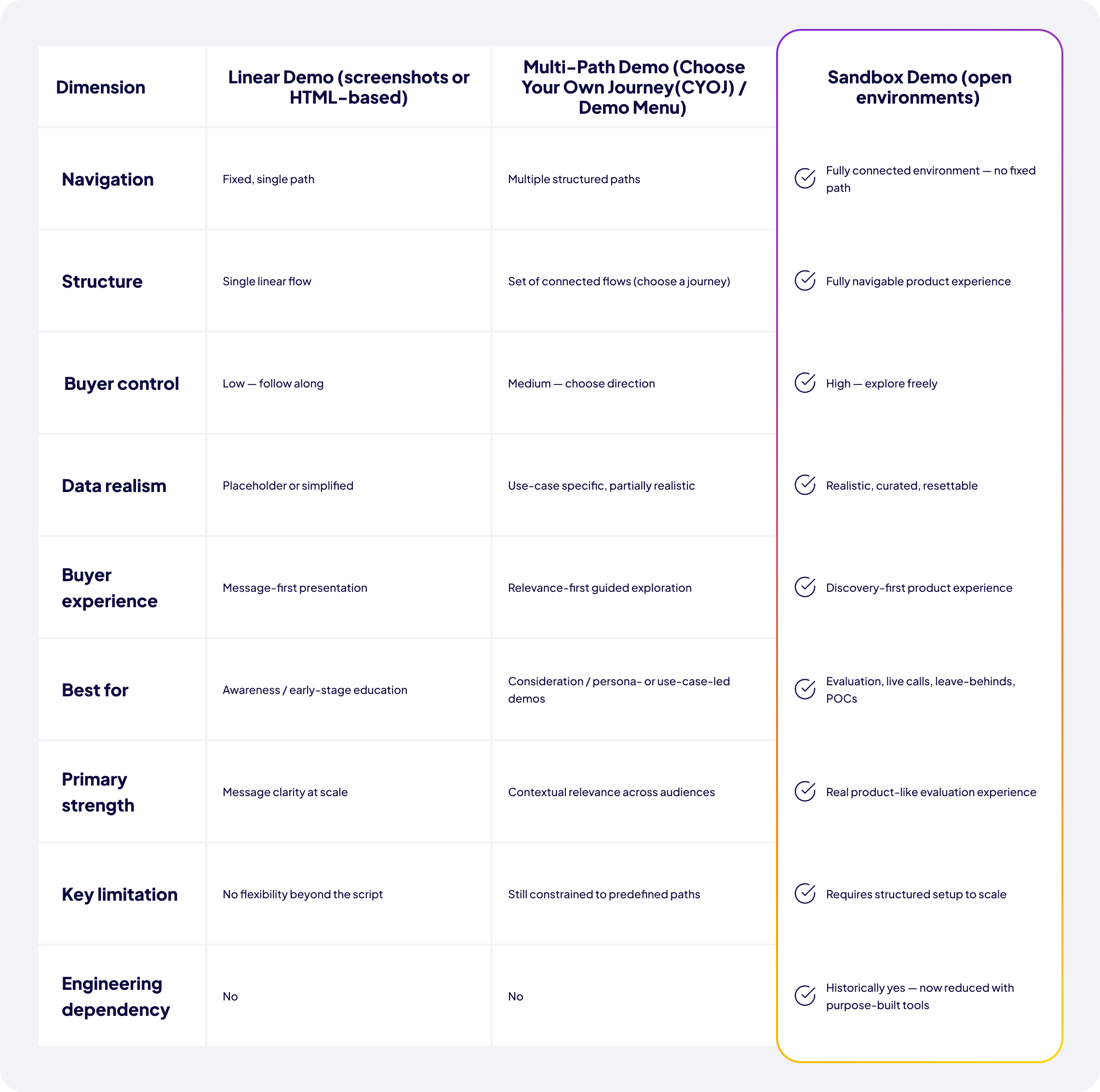
How it differs from other demo types:
Why most teams struggle to scale their sandbox:
What changes when the barrier is removed:
The business impact:
See how modern teams build scalable sandbox demos without engineering→
The term "sandbox" already exists in most SaaS companies — and that's part of what makes this conversation complicated.
Most organisations already have some version of a sandbox: a shared demo org, a test instance, or a controlled environment where the team shows the product. In that sense, the question isn't usually do you have a sandbox? Does the one you have actually work at scale?
When the demo automation category emerged, it borrowed the term to describe something more specific: an automated demo that is not linear, but open — one where you can navigate freely rather than following a fixed sequence. To distinguish it clearly, some teams call it an automated sandbox demo. The core idea is the same: a structured, navigable product experience that allows presales or sales teams to run consistent, interactive demos without rebuilding environments every time.
A sandbox demo in this sense has three core properties:
It is navigable — not scripted end-to-end. The presenter can follow the conversation, not just the click path.
It is controlled — data and flows are curated for storytelling. The experience looks and feels like the real product, but it is purpose-built for demonstration.
It is resettable and reusable — not rebuilt per deal. One environment serves multiple calls, multiple personas, and multiple use cases.
This is what separates it from both traditional shared sandbox orgs (which exist, but often don't hold up under pressure) and linear click-through demos (which are controlled, but can't flex in real time).
Once teams move toward sandbox-style demos, there are a few different ways to implement them — and they differ significantly in flexibility, cost, and scalability.
Some vendors create a full replica of a production-like environment, including frontend logic — HTML, CSS, JavaScript — and backend behaviour. The goal is a true-to-life copy of the product, hosted separately from production and maintained independently. Demostack and Reprise operate in this space.
This approach has real advantages. The experience is highly realistic, the fidelity to the actual product is strong, and it can support evaluation use cases that require deep technical exploration. The demo environment is reliable and relatively easy to edit within its own structure.
The challenge is maintenance — specifically, what happens when the product changes.
As one sales engineering leader put it:
"We clone the environment and that becomes our demo. But the moment something changes — a new page, a UI update — we can't just add it. We have to recreate the entire demo from scratch. That can take two to three weeks."
In practice, teams using this model often end up maintaining "demo versions" of the product that require dedicated engineering support. And because screens are captured from a single org, combining workflows from different parts of the product — or integrating third-party tools — is either difficult or impossible. The demo environment becomes an ongoing operational dependency rather than a scalable asset.
Another approach connects a demo layer to a live product through API integrations or overlay systems. This allows teams to adjust data dynamically or surface specific workflows during a call.
The advantages are real: the experience can be more dynamic than a static environment, it can reflect near-real-time data, and it is useful for structured enterprise demonstrations where accuracy is critical.
The trade-off is complexity and cost. Implementation cycles tend to be long. Infrastructure requirements are significant. And because these systems require technical configuration to modify, they are typically not accessible to the broader GTM team — they remain presales-owned tools that an AE or a customer success manager cannot pick up independently. You also cannot mix and match screens from different orgs, and there is no reliable way to integrate multimedia into the flow. It remains a very expensive tool for highly skilled people — without changing the fundamental dynamic of who can actually run a demo.
The emerging model is a modular, HTML-based sandbox layer where product screens are captured and connected into flexible, navigable flows. Instead of replicating the full backend, teams reconstruct the experience layer — combining realism with speed and adaptability.
The key enabler is what Demoboost calls Global Linking — connecting captured screens through internal navigation so that demos can be updated centrally. Change the master, and every linked demo reflects the update instantly. No rebuild required.
Crucially, this approach lets teams mix and match screens from different orgs, different tools, and different product areas into one coherent flow. Multimedia can be embedded. Speaker notes can be added so that AEs — not just SEs — can run the demo confidently.
This is what makes sandbox accessible at team scale. One environment can support live calls, leave-behinds, champion enablement, and onboarding — without requiring each use case to be built and maintained separately, and without filing a single engineering ticket.
Almost every team running advanced product demos already has a sandbox in some form. The question is not whether one exists. It is whether the one you have can actually scale.
In most organisations, the sandbox is effectively owned by presales or technical sales — the people who know how the product is structured, where the right workflows live, and how to assemble a coherent demo narrative under pressure.
That expertise makes the system work. But it also concentrates on it. Sales reps who don't live in the product every day rarely feel confident navigating it independently. As a result, the sandbox becomes something that is run for the sales team, not by them. Every demo that requires a sandbox also requires an SE. And as the team grows, the SE team becomes a bottleneck — not because they aren't doing their jobs, but because the system was never designed to be handed off.
To make sandboxes accessible across the team, most organisations rely on shared demo orgs. But once multiple people are using the same environment, consistency becomes very hard to maintain.
One rep creates contacts with placeholder names to quickly illustrate a workflow — names that made sense to them in that moment. Another rep opens the same environment the next day to present to a serious enterprise prospect and finds records that have nothing to do with their customer's context. Not because anyone made a mistake, but because the environment is shared and uncontrolled.
This kind of drift happens gradually, then all at once. Over time, the demo org accumulates test data, incomplete records, and inconsistent configurations from everyone who has touched it. In a high-stakes call, that unpredictability becomes a real risk — and there is no quick fix that doesn't involve someone spending hours cleaning up what others left behind.
Even when a sandbox is well-built and well-maintained, it rarely extends cleanly across the entire GTM organisation.
New hires need time to learn not just the product, but the internal logic of the demo environment — which org contains which workflow, how to navigate between modules, which data has been set up for which story. Reps rely on shadowing presales. And as teams grow across regions and segments, maintaining consistent demo storytelling becomes harder, not easier.
The result is a system that works well for the people closest to it, but becomes progressively more difficult to extend to everyone else. The sandbox exists. It just doesn't travel.
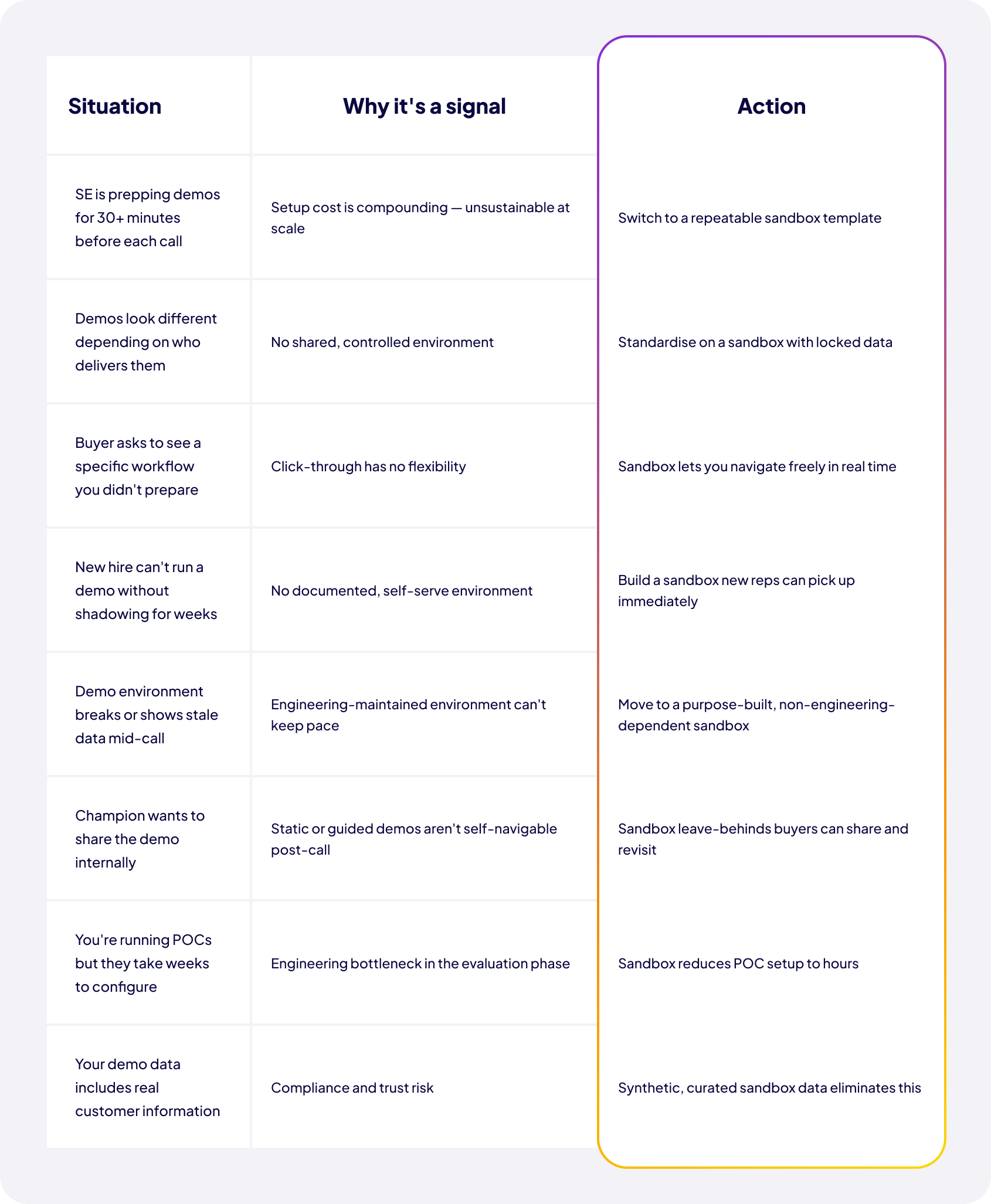
When teams move from traditional sandbox setups to a more scalable approach, the most significant shift is not what the demo looks like. It is how it is created, maintained, and reused — and what that means for both the team running it and the buyer on the other side.
Today, most presales teams spend a significant amount of time assembling demo environments before important calls — updating data to fit the specific deal, pulling together screens from different parts of the product, preparing multiple variations for different stakeholders.
Even experienced teams repeat this process over and over. Not because the demo changes substantially from call to call, but because every deal requires a slightly different version of the same setup built from scratch.
When that overhead is removed, the impact is immediate. Demo creation becomes reusable rather than repetitive. One structured sandbox environment can support multiple use cases without being rebuilt for each. Presales teams spend their time refining the narrative and understanding the prospect — not rebuilding environments they have built before. And because the demo is built with speaker notes and navigable flows, AEs can run it without SE support. The entire distribution of who can do what changes.
From the buyer's perspective, the most meaningful change happens after the live session.
In traditional setups, the demo is a moment in time. It happens during a call and once it ends, the experience is gone. At best, there is a recording. At worst, there is only memory — and whatever the champion remembers well enough to re-explain to the rest of the buying group.
With a reusable sandbox, that dynamic changes. After the call, buyers receive a link to the same environment they experienced live. They can revisit it on their own terms, explore areas they didn't get to during the call, and share it directly with stakeholders who were never in the room. The champion no longer has to recreate the demo — they can simply send the experience itself.
This matters most in complex buying groups, where decisions involve multiple people across different functions and timelines. The demo becomes a persistent asset rather than a one-time performance. And the SE who built it is no longer required to re-run it for every new stakeholder who joins the evaluation.
The change is twofold. Internally, teams stop rebuilding demos for every situation. Externally, buyers stop relying on memory or recordings to understand and share value.
The demo continues to work after the call ends — for both sides. And the decision to build or buy a demo environment becomes, in large part, a question of whether your current setup can support that model at the scale your team needs.
Each item below is a real operational signal — not a framing device.
If three or more of these are true, the format you're running is not the problem — the category is.
The gap between how most teams run demos today and what the best teams are building is real — and it is widening.
The good news is that the barrier has come down significantly. Building a scalable sandbox no longer requires what it once did. Teams that used to spend weeks on demo environment setup can now do it in hours — and maintain it without filing an engineering ticket.
The question is not whether sandbox demos are worth building. It is whether your current setup can support the team you are building toward — or whether it is already quietly holding you back.
Explore a Demoboost sandbox demo →
What is a sandbox demo? A sandbox demo is a navigable, controlled version of a product used for live sales demos and evaluation calls. It allows presales or sales teams to move freely through the product experience while keeping data and workflows curated. Unlike a scripted demo, a sandbox demo is not limited to a fixed path — it follows the conversation.
What is the difference between a sandbox demo and an interactive demo? An interactive demo usually refers to a guided, click-based experience with a defined flow. A sandbox demo goes further by allowing free navigation across the product experience during a live or follow-up session. Both are interactive, but a sandbox demo is designed for flexibility in real-time conversations rather than controlled message delivery.
What is the difference between a sandbox demo and a free trial? A free trial gives users access to the live product with real infrastructure and minimal guidance. A sandbox demo is a controlled environment designed specifically for evaluation and storytelling — it includes curated data and a structured experience, making it easier to understand the product without setup effort or an empty starting state.
Do you need engineering to build a sandbox demo? Traditionally, yes — sandbox demo environments were often built and maintained by engineering teams. Modern demo platforms allow presales or technical sales teams to build and maintain sandbox demos without coding. This reduces the dependency on engineering and makes updates faster and more scalable.
What makes a sandbox demo different from a live product demo? A live product demo runs directly in the production environment, which can introduce risk around data, stability, and consistency. A sandbox demo is a controlled, reusable version of the product experience designed for presentations and evaluation. It ensures consistent storytelling without relying on live system conditions.
When should you use a sandbox demo in the sales cycle? A sandbox demo is most effective during live evaluation calls, when buyers are actively assessing whether the product fits their needs. It is also valuable after the call as a shareable experience for internal stakeholders. Earlier-stage prospects are usually better served with lighter, guided demo formats.
How is a sandbox demo different from a click-through or guided demo? A click-through demo follows a predefined sequence designed to deliver a specific message at the right moment in the buyer journey — it is intentional, not incomplete. A sandbox demo allows navigation beyond a fixed path, enabling real-time exploration based on buyer questions. It is designed for live flexibility rather than linear storytelling.
What kind of data should a sandbox demo use? A sandbox demo should use realistic, synthetic data that reflects the buyer's context without exposing real customer information. The data should be consistent across workflows so that records and objects align throughout the experience. This improves credibility during evaluation calls and prevents the inconsistency that affects shared demo environments.
What is the biggest benefit of a sandbox demo for sales teams? The main benefit is reduced preparation time and easier execution of live demos — including the ability to hand the demo to AEs rather than requiring SE involvement for every call. Presales teams can reuse the same sandbox across multiple deals instead of rebuilding environments for each conversation. This makes demo delivery more consistent and scalable across GTM teams.
Can a sandbox demo be used after the sales call? Yes — a sandbox demo can be shared as a post-call asset that buyers revisit or forward internally. This helps champions explain the product to other stakeholders without needing to recreate the demo themselves. It turns the demo from a one-time event into a reusable evaluation experience.
Why do companies struggle with sandbox demos at scale? Most companies already have sandbox environments, but they are often hard to maintain, inconsistent across the team, or dependent on a small group of technical experts. As teams grow, this creates variability in demo quality and execution. The challenge is not creating a sandbox — it is making it operable and consistent across the full GTM organisation.
What is a modern sandbox demo approach? A modern sandbox demo is a reusable, navigable experience layer built on captured product screens or workflows — combining screens from multiple orgs or tools into one coherent flow. It allows presales and sales teams to update it centrally and deliver consistent demos without engineering involvement. Tools like Demoboost use Global Linking to make this scalable: change the master environment and every linked demo updates instantly.
How does a sandbox demo help with champion enablement? Champion enablement is one of the most critical and most neglected parts of complex sales cycles. Your champion needs to explain your product's value to stakeholders who were never in the original demo — often without you present. A sandbox demo gives them something concrete to share: a navigable, realistic product experience that speaks for itself. Instead of relying on your champion's ability to re-explain what they saw, you give them the tool to show it.
Book a live demo to see how Demoboost helps your team cut demo prep time, qualify buyers faster, and focus on real opportunities.
Book a Live Demo

.png)
.png)
