.png)
Learn how presales is evolving and howyour team can stay ahead in atech-driven sales landscape.

Buyers don't want to wait for a demo call to understand your product. They want to see it now — before they fill out a form, before they talk to a rep, and often before they've decided you're even on their shortlist.
At the same time, users who signed up last week aren't reading your documentation. They're clicking around for 30 seconds, not finding what they need, and quietly churning.
Product tour software solves both problems. It lets you build interactive, self-guided product experiences that run without live product access or engineering support — giving prospects a way to evaluate your product before they're ready to talk to sales, and giving users a path to value before they give up.
But "product tour software" now covers a wide range of tools with very different purposes: lightweight click-through walkthroughs for marketing, high-fidelity sandbox environments for enterprise presales, in-product onboarding overlays for new customers, and qualification demos that feed engagement data directly to your CRM. Choosing the wrong category for your use case is one of the most expensive mistakes SaaS teams make.
This guide ranks the best platforms for 2026 — covering all major use cases — with real pricing, honest pros and cons, and a practical framework for choosing the right fit. For the full methodology behind how leading revenue teams deploy these tools, the Demoboost Interactive Demo Playbook is the best starting point.
For teams connecting tour engagement to pipeline data, Demoboost is built specifically for this outcome — See how it works →
Product tour software creates interactive, step-by-step walkthroughs that guide users — or prospects — through your product's key features and workflows. Unlike static help documentation or video tutorials, product tours deliver contextual, interactive, guided experiences.
There are two distinct types of product tour software that often get confused:
Standalone / prospect-facing demo tools create shareable replicas of your product that live outside the actual product. They can be embedded on websites, in email campaigns, in sales outreach, and in post-booking qualification flows. Prospects explore them without logging in to your actual tool. They capture engagement data and route it to your CRM.
In-app onboarding tools overlay guidance directly on your real product — tooltips, walkthroughs, checklists, and modals — and are triggered when users are logged in and interacting with the platform. The viewer needs access to the actual product environment to experience them.
Many teams use both concurrently. The confusion arises when teams buy an in-app onboarding tool expecting it to work for website demos, or buy a lightweight demo tool expecting it to drive post-signup activation.
For a full breakdown of how these use cases connect, see our demo automation solutions guide.
Product tours aren't just a UX nicety — they directly affect the metrics that determine whether a SaaS business grows.
Reduce time to value (TTV). Product tours guide users toward their first "aha moment" faster — the point where they understand concretely how your product solves their problem. Every day between signup and that moment is churn risk.
Minimise user frustration. Proactive guidance means users are less likely to feel confused and abandon the product before they've realised its value. Tours built around known friction points reduce support tickets and churn.
Increase feature discovery. Most users only ever use a fraction of a product's features. Tours surface the ones that drive retention — making it more likely users engage deeply enough to stay.
Improve activation rates. When left to explore independently, users often click around without taking the actions that signal activation. Tours keep users focused on the path to value, not the path to confusion.
Reduce support burden. Well-designed tours that address common questions proactively can reduce support ticket volume significantly — freeing CS teams for high-value work.
Qualify buyers before discovery calls. For sales-facing teams, standalone qualification tours can replace the cold discovery call entirely. The buyer self-selects their use case. The SE walks in knowing exactly what matters. Fewer unqualified demos, better-prepared conversations.
Want to see the qualification system in action? Explore a live sandbox demo →
Understanding the type taxonomy before evaluating platforms prevents costly mismatches between tool and use case.
The most common format. Users are taken through a series of predefined steps that they must interact with to proceed. The experience is guided and sequential — best for onboarding new users on critical workflows, or guiding prospects through a product's core value proposition.
Best for: New user onboarding, first-use activation, sales qualification demos.
Tooltips, hotspots, and pop-ups that draw attention to specific features at specific moments — without interrupting the user's current workflow. Feature callouts are triggered by user behaviour and timed to appear when relevant.
Best for: Highlighting new feature releases, drawing attention to underused capabilities, in-app contextual guidance.
Task-based guides that present a structured sequence of actions without requiring users to complete each step to proceed. Users can explore each item at their own pace. Checklists are particularly effective for products with longer activation journeys — users can track their own progress and return to incomplete steps.
Best for: Complex product onboarding, activation journeys with multiple required steps, products where activation takes more than one session.
Static or semi-interactive visual content embedded in the product or on marketing pages. Used to provide quick, top-level explanations of features or updates — particularly effective for simple concepts where an annotated screenshot or short GIF communicates faster than a full interactive tour.
Best for: Feature announcements, simple workflow explanations, marketing page product showcases.
If visitors land on your product page and bounce without taking action, a self-serve product tour creates a second conversion path. Many buyers who won't fill in a "request a demo" form will explore a self-guided product experience — and their engagement data is more valuable than a form fill.
When prospects book a call without having explored the product, discovery starts with context-setting rather than qualification. A qualification tour sent after booking — structured around use-case selection — changes this entirely. The SE walks in knowing what the buyer explored and which scenario they selected.
If users sign up but never reach activation, the product experience between login and value realisation is the problem. In-app tours that guide users toward their first meaningful action directly address this gap.
If customer success is running the same onboarding walkthrough for every new customer, product tour software creates a scalable alternative that frees CS capacity for expansion and retention.
Product-led growth requires buyers to experience value before talking to sales. Standalone product tours are the mechanism — letting prospects self-qualify through product engagement rather than a sales conversation.
If you can't answer "which product areas did this prospect explore before our call?" you're missing one of the best qualification signals available. Standalone demo tools with CRM integration solve this. For the full picture, see our demo automation solutions guide.
Best for: Mid-market and enterprise B2B SaaS teams with presales or SE functions who want product tours to function as qualification and pipeline assets — not just marketing experiences.
Demoboost is the only platform in this category built end-to-end to connect product tour engagement to pipeline intelligence. While other tools focus on creating compelling experiences, Demoboost connects every tour touchpoint to the qualification and revenue data your sales team needs to act on.
Standout capabilities:
See it in action on the Demoboost sandbox demo page.
Ideal for: Presales leaders who want tours to qualify buyers before discovery calls, and revenue leaders who want demo engagement in their pipeline view. Start with the Interactive Demo Playbook for the full methodology.
Pros:
Cons:
Pricing:
View pricing details or contact the team directly.
Best for: Marketing and presales teams who need to build high-quality standalone product tours quickly, with AI assistance and minimal technical overhead.
Storylane has established itself as one of the fastest ways to create interactive product tours for website embedding, sales outreach, and demand generation. Multi-format capture (screenshot, video, HTML), strong AI tools, and an intuitive drag-and-drop interface make it the go-to for high-volume tour creation.
Standout capabilities: Multi-format capture, AI-powered guide creation (tooltips, voiceovers, presenter videos), Buyer Hub for bundling multiple tours into one shareable link, sandbox environments for editing UI without touching production, comprehensive engagement analytics.
Pros:
Cons:
Pricing:
Best for: PLG SaaS companies embedding self-serve product tours on website pages, in email sequences, and across marketing flows — particularly teams focused on account-based marketing.
Navattic is the most established platform for PLG-oriented product tours, ranking consistently at the top of search results for tour-related keywords. Its no-code builder is fast and accessible, its account deanonymisation is strong, and its HubSpot/Salesforce integrations are well-regarded.
Standout capabilities: No-code demo builder, pixel capture (web, mobile, desktop), personalisation variables, account tracking and deanonymisation, real-time engagement alerts via Slack/email, offline demo support for events, AI Copilot for guided tour creation.
Pros:
Cons:
Pricing:
Best for: Marketing teams and early-stage companies creating short, polished product tours for websites, social media, and campaigns.
Arcade trades depth for speed and visual quality. Median publish time is six minutes. 95% of G2 reviewers report improved engagement. Not built for presales complexity or deep analytics — but excellent for top-of-funnel awareness.
Standout capabilities: Chrome extension capture, content remixing (combine screenshots, recordings, and existing demos into new tours), intuitive customisation, CRM integration for key account tracking.
Pros:
Cons:
Pricing:
Best for: Growing SaaS companies that need robust in-product onboarding across web and mobile platforms, with advanced analytics and A/B testing built in.
Userpilot is a comprehensive digital adoption platform designed for product and growth teams. It excels at creating conditional, personalised onboarding flows that respond to user behaviour — and it's one of the few tools with genuine native support for both web and mobile (iOS + Android).
Standout capabilities: Native SDKs for web and iOS/Android, advanced flow logic with conditional branching, modals/tooltips/slideouts/carousels/checklists/hotspots, built-in event tracking and funnel analysis, A/B testing framework, user journey mapping.
Pros:
Cons:
Pricing:
Best for: Established SaaS companies that want a mature, stable in-product onboarding platform with strong mobile support and a proven track record.
Appcues has been in the market long enough to have excellent template libraries, extensive documentation, and a well-developed integration ecosystem. Teams can launch basic flows quickly while still having access to advanced segmentation and testing capabilities.
Standout capabilities: Guided flows, checklists, and NPS capabilities, advanced segmentation, native iOS and Android SDKs, 30+ integrations, comprehensive documentation and templates.
Pros:
Cons:
Pricing:
Best for: Design-heavy SaaS products that need pixel-perfect, brand-consistent in-product onboarding experiences with sophisticated targeting and A/B testing.
Chameleon prioritises visual quality and customisation depth above all else. Full CSS control, custom styling for every UI element, built-in NPS and micro-surveys, and a comprehensive A/B testing framework make it the go-to for teams where the onboarding experience is itself a brand touchpoint.
Standout capabilities: Full CSS control and pixel-perfect customisation, advanced behavioural triggers, built-in micro-survey and NPS collection, A/B testing platform with statistical significance tracking, deep connections with Mixpanel, Amplitude, and Segment.
Pros:
Cons:
Pricing:
Best for: Product and growth teams that want both deep product analytics and in-product guidance from a single platform.
Pendo is unique in combining product tour capabilities with retroactive product usage analytics — meaning you can analyse historical user behaviour without re-instrumentation. The platform is best thought of as product intelligence infrastructure that includes guided tours, rather than a dedicated tour tool that includes some analytics.
Standout capabilities: Deep product usage analytics, retroactive analysis, user behaviour tracking and retention analysis, integrated tour builder, NPS and feedback management, product roadmap communication tools.
Pros:
Cons:
Pricing:
Best for: Startups and growing SaaS companies that need effective in-product onboarding without enterprise-level complexity or pricing.
UserGuiding strikes a good balance between functionality and affordability. Chrome-based point-and-click builder, smart segmentation, a built-in resource centre, and multi-language support — at a price point that's accessible well before Series A.
Standout capabilities: Chrome builder (point-and-click on live product), smart segmentation, resource centre integration, multi-language support, goal tracking.
Pros:
Cons:
Pricing:
Best for: Large enterprises implementing digital transformation initiatives or complex internal training programmes across multiple applications.
WalkMe is a category of its own. While consumer tools focus on SaaS product onboarding, WalkMe is built to handle sophisticated workflows across multiple enterprise systems — including desktop applications. It's the platform of choice for large organisations implementing new ERP, CRM, or HRIS systems and need to guide employees across different software environments simultaneously.
Standout capabilities: Smart walkthroughs spanning multiple applications, desktop app support (rare in this category), enterprise analytics dashboard, workflow automation within guided experiences, enterprise-grade security with SSO, role management, and audit trails.
Pros:
Cons:
Pricing: Starts around $12,000/year. Custom enterprise pricing based on scope, number of applications, and user volumes.
Best for: Small SaaS teams wanting interactive product tours without budget commitment, particularly for step-by-step how-to style demos and product walkthroughs for onboarding or support documentation.
Supademo earns consistent praise for its intuitive workflow recording and persona-based journey mapping. The Chapters feature — breaking tours into digestible sections — is a practical differentiator for product education use cases. 63% of users are from small businesses.
Standout capabilities: Chrome extension capture (HTML, screenshots, video), AI voiceovers and annotations, dynamic variables, branching, multi-demo showcases, persona-based journey mapping.
Pros:
Cons:
Pricing:
Best for: Budget-conscious teams that need professional in-product onboarding capabilities with enterprise-grade security — without enterprise pricing.
Usetiful stands out for delivering enterprise features (SSO, compliance certifications, white-label options) at a price point accessible to early-stage teams. The Plus plan at $39/month is one of the lowest entry points in the in-app category that still includes multi-element tours, advanced segmentation, and localisation support.
Standout capabilities: Multi-element tour creation (tooltips, modals, checklists, banners), advanced segmentation, white-label customisation, localisation support, enterprise security features (SSO, compliance certifications).
Pros:
Cons:
Pricing:
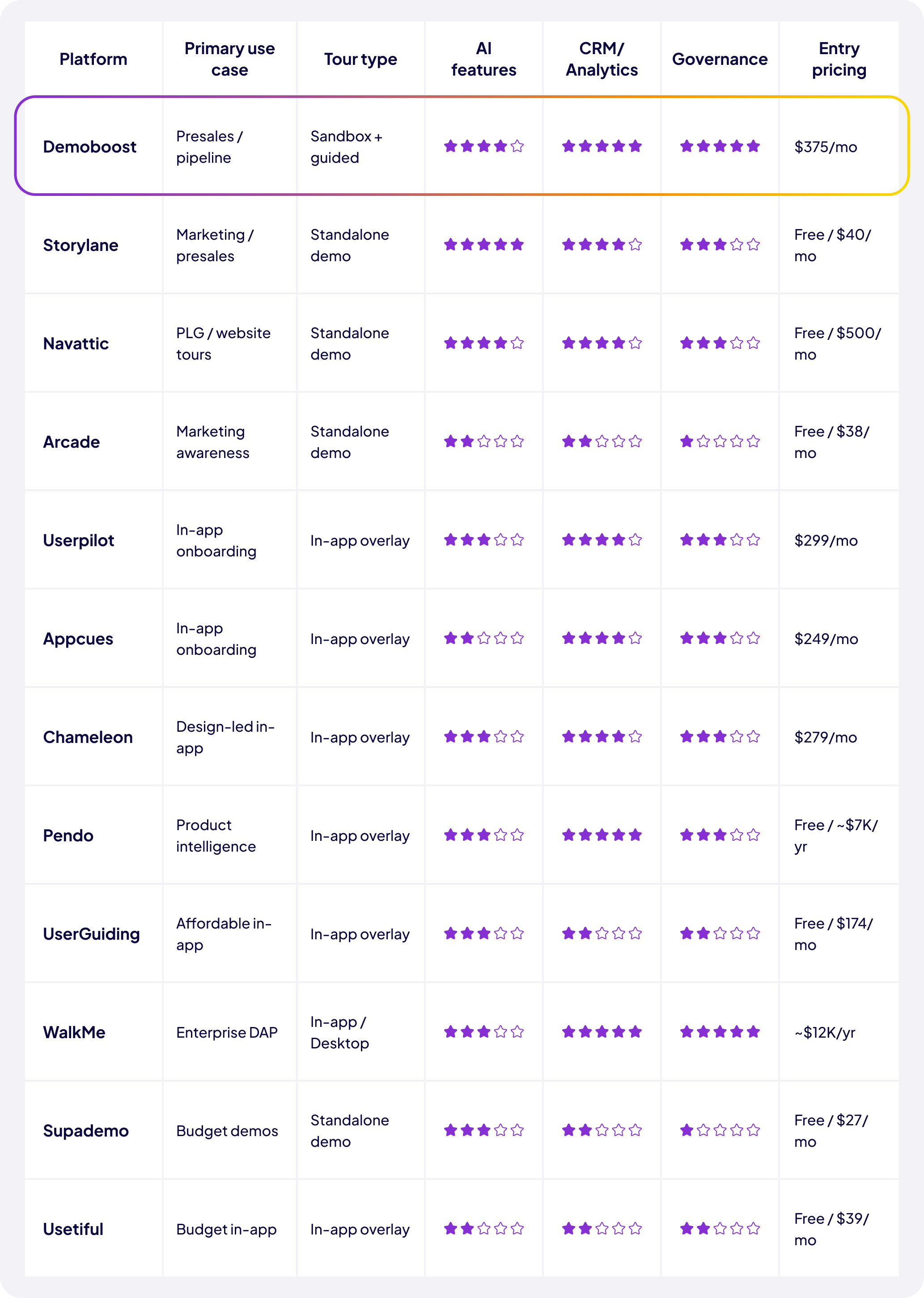
The single most important question before evaluating any platform: are you building a tour for prospects (standalone demo, runs outside your product) or for customers (in-app overlay, runs inside your live product)? Most platforms are optimised for one or the other. Don't buy a Pendo or Appcues expecting to embed a tour on your homepage — it won't work. Don't buy Arcade expecting it to guide new users after signup — that's not what it's for.
When choosing a product tour for website embedding, four things matter above everything else:
Tools that work for homepage embeds: Demoboost, Storylane, Navattic, Arcade, Supademo. Tools that generally won't work for homepage embeds: Userpilot, Pendo, WalkMe, Whatfix — they're built for logged-in users.
Session-level analytics (total views, average session time) are marketing vanity metrics for sales teams. Sales qualification needs contact-level data: who viewed the tour, what they engaged with, how many times they returned, and whether they shared it internally. If the platform can't identify individual viewers, it can't drive lead qualification.
For ACV below $10K, a standardised tour typically suffices. For ACV above $50K, personalisation is expected — and manually adapting tours for every enterprise deal doesn't scale. Check whether the platform offers automated branding, dynamic data views, and use-case-specific flow branching. For the in-app category, check whether segmentation targets are based on behaviour, not just user properties.
Every time your product UI changes, tours need updating. The question is how much effort that requires. Platforms with global update propagation (one master, many variants) can make a change once and have it apply everywhere. Screenshot-based tools require manual re-capture of every affected screen. For teams shipping features frequently, this maintenance cost compounds quickly.
The most effective tours open with a pain point — "here's what it looks like when [problem occurs]" — before demonstrating the solution. Tours that lead with feature overviews lose buyers before they reach the value moment.
Research consistently shows tours with more than four or five steps have significantly lower completion rates. Every additional step is a potential exit point. Set one clear objective per tour: is the goal to demonstrate a specific workflow? Qualify use-case intent? Show integration with a prospect's existing stack? Design for one outcome.
A tour built for a marketing director and a tour built for a solutions engineer should be different experiences — different pain points, different features, different CTAs. Persona-level personalisation consistently converts at higher rates than generic walkthroughs. Most platforms support this through either manual branching or AI-powered adaptation.
Not every user or prospect wants to be guided. Forcing someone through a tour they've already completed — or don't need — creates friction rather than value. Make tours skippable. Users who want guidance will follow it; users who don't will appreciate the option to dismiss.
A tour without a CTA is a missed conversion. For awareness-stage tours: "Explore another use case." For mid-funnel: "Download the guide." For bottom-funnel: "Book a 20-minute call." Match the CTA to where the buyer is in their decision process.
Building a tour that looks impressive but doesn't qualify the buyer, skipping engagement tracking so you have no signal to act on, and letting tour libraries grow without governance are the three most costly mistakes teams make. For a full breakdown, see our guide on product demo mistakes to avoid.
Great tours are built once and improved continuously based on how real users interact with them.
Where are users dropping off? If exits cluster at step two, the intro isn't compelling enough. If they're rushing through all steps without interacting, they're tapping "Next" to dismiss the tour. Completion rate by step reveals exactly where the tour loses the user.
For in-app tours: how long does it take for guided users to reach their first meaningful product action versus unguided users? If the gap is significant, the tour is working. If guided and unguided users activate at similar rates, the tour content or timing needs rethinking.
Do users who complete a qualification tour book discovery calls at a higher rate? Do users who complete an onboarding checklist retain better at 30 days? This comparison is the clearest measure of a tour's actual business impact.
Test tour length (short vs. detailed), presentation format (modal vs. tooltip vs. checklist), CTA phrasing, and triggering conditions (on first login vs. after first action). Even small improvements in completion rate compound significantly at scale.
Free product tour software options: Navattic (Starter), Storylane (basic plan), Arcade (Free tier), Supademo (Free), Pendo (up to 500 MAUs), Usetiful (Free), UserGuiding (Support Essentials), Chameleon (HelpBar only).
For full details on Demoboost’s current tiers, included seats, AI features, integrations, and analytics, see the Demoboost pricing page.
Product tour software in 2026 covers a spectrum that runs from a free Arcade tour on your homepage to a full WalkMe enterprise implementation across six internal systems. Choosing the right tool requires knowing where you sit on that spectrum — and being honest about the gap between "impressive demo" and "qualified pipeline" or "activated user."
For prospect-facing tours that connect to revenue outcomes, Demoboost is the platform built to close that gap — from sandbox demo creation through qualification signals to Salesforce pipeline data. For self-serve marketing tours, Navattic and Storylane are the clear leaders. For in-app activation and onboarding, Appcues and Userpilot are the mature, reliable choices at mid-market, and UserGuiding at startup budgets.
The question in 2026 isn't whether to have product tours. It's whether the tours you have are doing qualification or activation work — or just sitting on a page looking impressive.
See how Demoboost connects product tours to pipeline →
Product tour software lets SaaS teams build interactive, self-guided product experiences that run without live product access or engineering support. The category splits into two types: standalone demo tools (used for prospects on websites, in sales flows, and in qualification processes) and in-app onboarding tools (used for customers after login to drive activation, adoption, and retention). Most mature SaaS teams use both.
Several platforms offer meaningful free tiers: Navattic (1 HTML demo, unlimited views), Storylane (basic screenshot demos), Arcade (3 published tours), Supademo (5 demos), Pendo (up to 500 MAUs), Usetiful (basic in-app tours), and UserGuiding (Support Essentials). For standalone prospect-facing demos, Navattic's free tier is the strongest starting point. For in-app onboarding, Pendo's free tier covers teams up to 500 MAUs.
Functionally, the terms are often used interchangeably — and the distinction is blurring in 2026. Historically, a "product tour" referred to a lighter, marketing-focused click-through walkthrough, while an "interactive demo" described a deeper presales experience. The relevant distinction today is fidelity and purpose: a screenshot click-through for website awareness versus a high-fidelity sandbox environment for enterprise presales evaluation. Both live within the broad "product tour software" category.
A product walkthrough typically refers to an in-app guided experience — overlaid on the real product, triggered for logged-in users, guiding them through a workflow step by step. A product tour can refer to both in-app walkthroughs and standalone demos shown to prospects outside the product. Navattic's blog describes it well: "A product walkthrough is within the product itself. An interactive product tour is a shareable replica of your product."
The basic process: (1) define the buyer persona or user segment you're building for and the one outcome you want the tour to achieve; (2) capture your product screens — via browser extension, URL capture, or screenshot upload; (3) add annotations, tooltips, and CTAs to guide the viewer; (4) connect to analytics and CRM; (5) embed or share through your chosen channel. Most modern platforms make steps 2–4 achievable in under two hours for a first tour. The strategic groundwork in step 1 is what separates tours that convert from tours that are ignored.
For most SaaS teams, yes. ROI comes from multiple directions: higher website conversion rates from self-serve tours, shorter sales cycles from better-qualified discovery calls, faster user activation from in-app onboarding guidance, and reduced support volume from proactive help documentation. One research finding puts tour-driven support ticket reduction at 30–50%. The question is which tier of tooling is appropriate for your current stage — not whether to invest at all.
For awareness and early qualification stages, increasingly yes. For complex enterprise deals where the SE needs to respond dynamically to buyer questions, live demos remain valuable — but product tours change when they happen and how well-prepared the buyer is when they do. Tours reduce the number of live demos required per deal and ensure every live demo starts with a buyer who has already validated that the product is relevant.
In-app product tours guide users toward their first meaningful product action — the "aha moment" where they understand concretely how your product helps them. Without a tour, users often click around aimlessly, miss key features, and churn before realising value. Tours that are short, focused on one activation goal, and personalised to the user's role or use case consistently improve activation rates and reduce churn risk in the first 30 days.
The non-negotiables depend on use case. For prospect-facing tools: no-login access, fast load times, contact-level analytics, CRM integration, no-code creation, and custom branding. For in-app tools: segmentation and targeting based on behaviour, conditional branching, multi-element support (tooltips, modals, checklists), analytics with completion tracking, and integration with your CRM or analytics stack. For both: governance controls appropriate to your team size and content update efficiency.
For enterprise B2B SaaS with a dedicated presales function, Demoboost provides the strongest combination of sandbox demo fidelity, AI personalisation, Salesforce integration, lead analytics, and governance controls. For in-app enterprise adoption at scale, WalkMe handles complexity no other tool can match. For multi-stakeholder enterprise buying processes where demos need to reach people the SE never speaks to directly, Consensus adds buying committee intelligence to the mix. See the Demoboost pricing page for enterprise options.
Book a live demo to see how Demoboost helps your team cut demo prep time, qualify buyers faster, and focus on real opportunities.
Book a Live Demo

.png)
.png)
